


Top Picks

You can make daily tasks easier this winter by adding simple tactile markers to the devices and surfaces you use most. This roundup focuses on easy-to-apply raised dots that help you find buttons, switches and keys by feel so you waste less time and reduce errors.
Use a tactile bump dot where you need it most to improve independence, speed and confidence.
Selection Criteria
You want aids that are reliable, easy to apply and actually helpful in everyday situations. We evaluated options on adhesion (how well the dots stay in place), tactile clarity (how distinct the raised shape feels), size and shape variety, color contrast, material durability, pack size relative to price, and suitability for specific users such as people with low vision, blindness or age-related decline.
We also considered real-world use cases — remotes, microwaves, washing machines, keyboards and personal items — and how each product supports independence and efficiency. Scores weigh durability and ease of use heavily, while variety and value influence picks for multi-use households.
Table of Contents
Best Assortment
- Braille stickers with various shapes assist in marking household appliance buttons for easier tactile identification.
- Tactile identification helps individuals with visual impairments distinguish everyday objects through touch.
- Made of smooth, soft, odorless silicone material suitable for metal, glass, and plastic surfaces.
- Includes 245 pieces in circular and square shapes across 7 color sheets for versatile marking needs.
- Adhesive dots prevent accidental impacts when applied to furniture edges or sharp corners.
- Supports independent living for blind, low-vision, and elderly users by simplifying object navigation.

If you want small, practical ways to make everyday tasks easier this winter, these tactile bump dot stickers are one of those low-effort, high-impact fixes you can stick around the house. You get a big pack of silicone dots in different shapes and colors so you can code remotes, microwaves, washing machine dials, light switches, and pantry items by touch.
They’re soft to the fingertips, peel off the backing without fuss, and work best on smooth surfaces like glass, plastic and metal. In the darker, busier months when you’re juggling coats and mittens or helping someone with low vision, those little markers save time and reduce stress.
They’re subtle when you want them to be—clear or muted dots—or brightly visible when contrast matters. If you’re hosting or traveling, you can temporarily mark essential controls and then remove them later, which makes them practical for both daily life and special occasions.
I recommend keeping a sheet in a drawer so you can add tactile cues wherever you notice friction or confusion.
What People Say
Reviewers commonly praise how sticky and durable the dots are on smooth surfaces and how the variety of shapes and colors makes it easy to set up a tactile system. Many people note that they make daily tasks quicker and help older adults or those with vision loss feel more independent, while a few mention adhesion issues on textured or worn remotes.
Situational Benefits
|
Situation |
How It Helps |
|---|---|
|
Kitchen Controls |
Mark commonly used buttons on the microwave, oven or dishwasher so you can find start, stop and presets without squinting. |
|
Remotes & TVs |
Add a tactile reference for power, volume or input buttons so you don’t fumble when the lights are low. |
|
Medication & Pantry |
Label pill bottles, jars or cans with different shapes so you can identify items by touch and reduce mistakes. |
|
Everyday Aids |
Use on light switches, water bottles, or mobility devices to support someone with low vision or memory challenges. |
Versatility
You can use these dots almost anywhere you need a quick tactile cue: appliances, personal devices, storage containers, or temporary setups for travel and events. The mix of clear and colorful pieces makes them flexible for both discreet and highly visible coding.
Aesthetic Appeal
Because there are clear and muted options alongside bright colors, you can keep things looking tidy or make markers pop for easy spotting. The low-profile silicone keeps things from feeling bulky.
Practicality
They’re simple to apply—peel and press—and come in a big quantity so you’re unlikely to run out. Best adhesion is on smooth surfaces; textured or greasy surfaces may need cleaning first or extra adhesive.
Problem Solving
These adhesive tactile stickers solve the everyday problem of locating controls and items when vision or lighting is limited, helping you or a loved one stay independent and safe around the home.
Key Benefits
- Helps you find buttons and controls by touch, improving speed and confidence
- Large 245-piece set covers the whole home and small outings
- Assorted shapes and colors let you create a simple, tactile code
- Soft silicone feels pleasant under the finger and won’t scratch surfaces
- Clear and bright options let you choose between subtle and high-contrast markers
Rating: 4.7 (total: 65+)

Most Durable (and Bright)
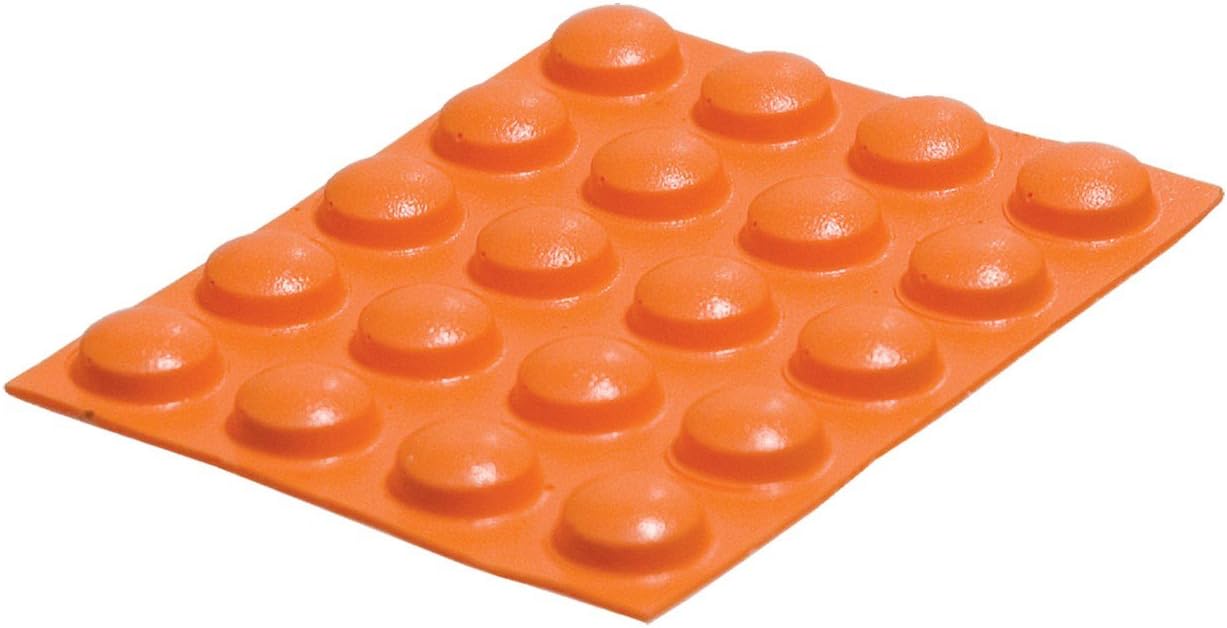
- Large round design for easy tactile identification
- Bright orange color provides high visibility
- Durable polyurethane polymer ensures long-lasting performance
- Strong adhesive backing holds firmly with thumb pressure
- Non-damaging adhesive preserves surfaces during application
- Compact size allows versatile placement on multiple items
- Suitable for household appliances, electronics, and office equipment
- Enables tactile navigation for individuals with visual impairments

If you’re looking for one small change that makes a noticeable difference in day-to-day ease, these large orange bump dots are the kind of low-effort tweak you’ll use more than you expect. You peel, press with your thumb and suddenly the microwave, remote, thermostat or phone has a tactile reference so you can find the right button without hunting. Made from durable polyurethane and sized to be easy to feel, each tactile bump dot is built for frequent use and sticks best to clean, flat surfaces like glass, plastic and metal.
They’re handy for daily routines—think morning coffee and laundry—as well as for visits, travel, or helping an older family member feel more independent when the light is low. Keep a sheet in a drawer and you’ll be surprised how often you reach for them.
What People Say
Customers frequently note that the dots are easy to apply and stick well to smooth surfaces, helping older adults and people with low vision gain confidence with appliances and remotes. Reviewers also appreciate the large, easy-to-feel size and durable feel, while a minority report adhesion problems on textured or worn surfaces or find the profile a bit high for some buttons.
Situational Benefits
|
Situation |
How It Helps |
|---|---|
|
Microwave & Oven |
Mark start, stop or preset buttons so you can operate cooking settings without needing to see the display. |
|
Remotes & TVs |
Add a tactile guide for power, volume or input controls so you can change settings in the dark or when you’re multitasking. |
|
Laundry & Appliances |
Identify common cycles and start buttons on washers, dryers and dishwashers to cut down on mistakes and frustration. |
|
Medication & Containers |
Use on pill bottles or storage lids to create a simple, touch-based system for frequently used items. |
Versatility
You can stick these on almost anything with a smooth face—appliances, phones, remotes, jars and switches. They work as a semi-permanent solution at home or a temporary fix when you’re traveling or hosting, making them useful across different situations.
Aesthetic Appeal
The bright orange finish is bold and high-contrast so markers are easy to see, while the simple round shape keeps the look tidy. They’re not decorative, but they do make functional sense on most devices.
Practicality
Application is quick—peel and press—and the adhesive holds well on clean, flat surfaces. If a surface is textured, dirty or greasy you may need to clean it first or test adhesion; a few users found them less cooperative on worn buttons.
Problem Solving
These tactile bump dot markers solve the everyday problem of fumbling for controls or mispressing buttons, helping you move faster and helping others maintain independence with simple, touch-based cues.
Key Benefits
- Makes buttons and controls easy to locate by touch, speeding up routine tasks
- Durable polyurethane construction holds up to repeated presses
- Large size gives a clear tactile target for people with low vision
- Strong adhesive backing applies with just thumb pressure on clean, flat surfaces
- Bright orange color increases visibility while still working as a tactile cue
Rating: 4.5 (total: 54+)
Best Bulk Value
- 300-piece set provides multiple color and style options to suit different needs
- Raised silicone dots create tactile markers for identifying buttons and controls
- Strong adhesive backing stays securely attached to various surfaces
- Helps visually impaired users navigate electronic devices and household items independently
- Durable silicone material withstands frequent touch without wearing down
- Multi-purpose design also protects surfaces from dents and scratches
- Simple application requires no additional tools or installation expertise
- Universal compatibility works with keyboards, appliances, and other everyday objects

If you want a simple, low-effort upgrade to make everyday controls easier to find, this 300-piece set of tactile bump dot stickers is an easy place to start. You peel and press them onto remotes, keyboards, microwave buttons or phone chargers and instantly give yourself reliable touch cues.
The silicone feels soft but sturdy, and the mix of colors and shapes helps you assign different meanings so you don’t have to guess. They work for daily routines, helping a family member, or tossing a few in a travel kit for dim hotel rooms or busy holiday prep. Keep a sheet in a drawer and you’ll be surprised how often you reach for them.
What People Say
Across reviews people commonly praise the variety of shapes and colors, saying the dots are the right size for keyboards and remotes and stick securely on smooth surfaces. Many note that they make routine tasks quicker and help older relatives or anyone with low vision feel more independent. A few users mention adhesion can be spotty on worn or textured buttons, so a quick surface clean helps.
Situational Benefits
|
Situation |
How It Helps |
|---|---|
|
Keyboard & Typing |
Mark the home keys or commonly used shortcuts so you can find your position by feel while you type or practice touch typing. |
|
Remotes & TV |
Place a tactile cue on power, volume or mute so you can change settings in the dark without squinting. |
|
Kitchen Appliances |
Identify start or preset buttons on microwaves, ovens and coffee makers to avoid mistakes when you’re rushing or cooking with low light. |
|
Travel & On-the-Go |
Bring a few with you to mark shared remotes, rental car controls or hotel room devices so you can navigate unfamiliar gear quickly. |
|
Medication & Labels |
Use colored dots to create a simple touch-based system for pill bottles, containers or frequently used jars. |
Versatility
You can stick them on almost any smooth surface—appliances, phones, remotes, jars and switches—and switch them out as needs change. They work as a semi-permanent solution at home or a temporary fix when you’re traveling or hosting.
Aesthetic Appeal
The pastel assortment of blue, pink and light green feels friendly and unobtrusive; they’re more functional than decorative, but the different colors help keep things organized without being loud.
Practicality
Application is quick—peel and press—and most users find the adhesive reliable on clean, flat surfaces. If a button is textured or worn, cleaning first or choosing a smoother spot usually fixes the problem.
Problem Solving
These tactile bump dot stickers solve the small but persistent problem of fumbling for controls, helping you move faster and giving family members with low vision clearer, touch-based cues for independence.
Key Benefits
- Makes buttons and controls easy to find by touch, cutting down fumbling and mispresses
- 300-piece assortment gives plenty for home, office and travel needs
- Soft but durable silicone is comfortable under a fingertip and holds up to frequent use
- Varied shapes and colors let you create a simple tactile code for different devices
- Strong adhesive sticks well to clean, flat surfaces like plastic, glass and metal
Rating: 4.6 (total: 15+)

Most Contrast
- Tactile markers enable touch-based identification for visually impaired users
- Multiple shapes and sizes accommodate different preferences and item types
- High-contrast colors enhance visibility for low vision individuals
- Durable silicone construction ensures long-lasting performance
- Large quantity provides cost-effective solution for numerous applications
- Simple adhesive application allows quick customization of household items

These 165 tactile bump dot stickers are a low-effort way to make everyday controls easier to find by touch. You peel and press them onto remotes, keyboards, appliance buttons or phone chargers and instantly get a reliable tactile cue that reduces fumbling.
The set includes multiple shapes and high-contrast colors so you can create a simple code—use a red dot for power, yellow for volume, a small dot for home keys—making both daily routines and busy moments like holiday cooking or travel setups smoother. They feel soft under a fingertip but hold up to regular use, and if you want a quick accessibility upgrade around the house, they’re the kind of practical tool you’ll reach for again and again.
What People Say
Customers frequently praise the clear color choices and variety of shapes, saying the dots make remotes, keyboards and appliance buttons much easier to find. Many people note the stickers stick well on smooth surfaces and help older relatives or anyone with low vision feel more independent, while a few mention adhesion is less reliable on textured or worn buttons.
Situational Benefits
|
Situation |
How It Helps |
|---|---|
|
Keyboard & Typing |
Mark home keys or shortcuts so you can find your place by feel, which is great for touch typing or helping someone with low vision work more confidently. |
|
Remotes & TV |
Put a tactile cue on power, volume or mute so you can change settings in the dark or without having to squint. |
|
Kitchen Appliances |
Identify start, timer or preset buttons on microwaves, ovens and coffee makers so you don’t press the wrong control when you’re rushing. |
|
Travel & On-the-Go |
Bring a few with you to label shared remotes, rental car controls or hotel room devices for easier navigation in unfamiliar spaces. |
|
Medication & Labels |
Use different colors to create a touch-based system for pill bottles, jars or daily essentials so you can quickly distinguish items. |
Versatility
You can stick these on almost any clean, smooth surface—plastic, glass or metal—and they work as a semi-permanent solution at home or a quick, removable fix when you’re traveling or hosting. The mix of shapes and sizes gives you options for subtle cues or stronger tactile markers depending on the device.
Aesthetic Appeal
The bold red, yellow, black and white palette is practical rather than decorative; the high-contrast look is designed to help recognition rather than blend in, but the small, neat shapes remain unobtrusive on most devices.
Practicality
Application is straightforward—peel and press—and most people find the adhesive reliable on clean, flat surfaces. For textured or worn buttons, a quick surface clean or choosing a smoother nearby spot usually improves stickiness.
Problem Solving
These tactile bump dot stickers solve the small but persistent problem of fumbling for controls, helping you move faster and giving family members with low vision clearer, touch-based cues that support independence.
Key Benefits
- Makes buttons and controls easy to find by touch, cutting down on fumbling and mispresses
- 165-piece assortment gives plenty for home, office and travel needs
- Multiple shapes and sizes let you assign different meanings so you can build a tactile system
- High-contrast red, yellow, black and white colors improve visibility for people with low vision
- Soft silicone surface is comfortable under a fingertip and generally durable with normal use
Rating: 4.6 (total: 260+)

What Are The Must-Have Visual Aids?
You want tools that increase speed, reduce frustration, and preserve independence during darker months; the four visual aids to prioritize are tactile markers such as bump dots, a high-contrast large-print calendar or whiteboard for planning, a bright portable LED task light for focused work, and a magnifier or screen-magnification app for reading small text.
You can use a tactile bump dot kit to mark frequently used buttons and switches so you don’t fumble in low light, choose high-contrast printed or digital planners to keep deadlines visible at a glance, add an adjustable LED task light to reduce eye strain during tasks, and keep a compact magnifier or phone accessibility settings on hand for quick close-up reading.
These four items work together: tactile markers give you reliable touch cues, contrast and lighting reduce visual effort, and magnification handles fine detail so you stay productive through the season.
How Do You Choose The Right Tactile Markers For Different Devices?
You should match dot size, height, texture, and adhesive strength to the device and how you use it; larger, taller bumps are easier to find on appliances and ovens while flatter, smaller dots work better on remotes and keyboards so they don’t interfere with button travel.
Consider material and finish: silicone or polyurethane offers durability and a tactile feel, and clear or muted dots keep aesthetics while bright colors increase visibility.
Pay attention to package variety so you can use differing shapes to create a tactile code, and check manufacturer notes about indoor use and surface compatibility.
If you are marking frequently handled items choose stronger adhesive and test one dot for a few days; if you need temporary marks, select dots that peel off cleanly.
These choices help you tailor tactile markers to each use case without damaging controls.
How Do You Apply And Maintain Bump Dots For Reliable Long-Term Use?
You get the best longevity by preparing the surface, applying carefully, and checking periodically; first clean the surface with isopropyl alcohol and allow it to dry so the adhesive bonds, then warm the dot between your fingers if it feels stiff and press firmly for several seconds to ensure contact.
Test placement first on a noncritical button to confirm it doesn’t impede function, avoid placing tall bumps on buttons that require flush contact, and let newly applied dots set for several hours before heavy use.
If adhesive weakens on textured or oily surfaces, replace the dot or try a different material rather than using glue, and avoid superglue on delicate finishes because it can cause permanent damage.
Inspect dots every few months and replace any that lose height or stickiness to keep tactile cues consistent and reliable.
Wrapping Up
You now have four practical options to add tactile guidance to the devices and surfaces you use daily.
The Draupnir Bumps excel when you want a wide selection of shapes and colors for different applications; MaxiAids Dots are the best choice when you need larger, long-lasting markers for high-usage controls; the YAFIYGI Pack gives you the most pieces for many small projects; and Bleway Dots are tuned for older adults who benefit from clear, high-contrast markers.
Pick the one that matches how often and where you’ll use it, and place a tactile bump dot on the buttons you rely on most to save time and reduce frustration.
| Product | Image | Rating | Material | Dimensions | Number of Pieces |
|---|---|---|---|---|---|
| 245PCS Bump Dots for Visually Impaired |
 |
4.7/5 (N reviews) | Adhesive Tactile Stickers | 5.12 x 4.45 x 0.67 inches; 4.06 ounces | 245 |
| Bump Dots – Large, Orange, Round – 20 pcs. |
 |
4.5/5 (N reviews) | Polyurethane Polymer | N/A | 20 |
| 300 Pcs Bump Dots for Visually Impaired |
 |
4.6/5 (N reviews) | Silicone | 4.21 x 4.17 x 0.43 inches | 300 |
| Bump Dots for Visually Impaired 165 Pcs Combo Pack |
 |
4.6/5 (N reviews) | Braille Stickers | 6.89 x 4.61 x 0.67 inches; 1.41 ounces | 165 |